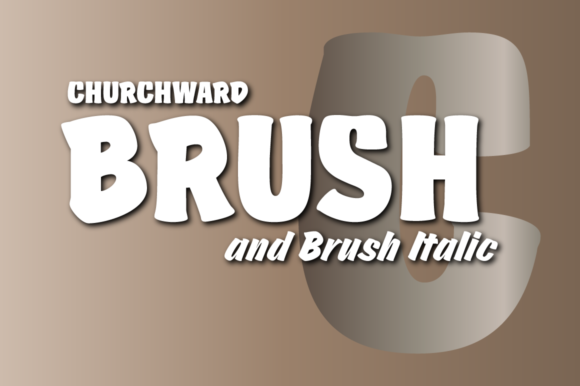
Churchward Brush: A Bold Display Font for Crafters and Product Designers
As a small business owner creating handmade labels, stickers, and digital downloads, I’m always on the hunt for fonts that stand out while remaining practical. Churchward Brush is one of those rare finds—a display font with a strong personality that still works beautifully across a wide range of physical and digital products.
Churchward Brush is a cool, bold, and urban-styled display font. Its thick strokes and brush texture give it a modern yet handcrafted feel. Whether you're designing a rustic farmhouse sign or a sleek boutique tag, this font brings a unique blend of edginess and elegance. It’s not overly delicate like some script fonts, nor is it too rigid like many sans serifs. Instead, it strikes a perfect balance, making it ideal for both print and digital use.
Where to Use Churchward Brush in Your Craft Business
If you're like me and sell on Etsy or run a small creative shop, you know how important it is to have a font that works across multiple product types. Churchward Brush has become a go-to for many of my projects because of its versatility. Here’s where it really shines:
- Product labels – From candles to skincare, this font adds a premium touch to sticker labels.
- Wedding stationery – Use it for welcome signs, place cards, or save-the-date postcards.
- Printable wall art – The boldness of Churchward Brush makes it perfect for motivational quotes or seasonal décor.
- Digital downloads – It’s a great fit for planners, social media templates, and SVG cut files.
- Merchandise – Works well on mugs, tote bags, and t-shirts where clarity and style both matter.
Why Churchward Brush Stands Out in Product Design
When you're selling physical products, the font you choose can directly impact how customers perceive your brand. Churchward Brush gives a sense of confidence and creativity. It reads as both modern and handmade, which is a sweet spot for many indie makers.
Its bold structure makes it easy to read even at smaller sizes, which is crucial when designing product tags or small stickers. I’ve used it for food packaging labels and boutique clothing tags, and it’s always held up well in print and on digital mockups. Because it’s a display font, it’s best used for short phrases, names, and titles rather than long paragraphs, but that’s exactly what makes it ideal for product-based design.
Real-World Examples That Bring Churchward Brush to Life
Let me share a few of my favorite uses:
- Farmhouse wall signs – Paired with a distressed wood background, Churchward Brush gives a rustic yet modern feel.
- Birthday invitations – I used it for a child’s party invite and got multiple compliments on how fun and readable it looked.
- Seasonal packaging – For holiday cookie boxes, this font gave a festive and professional finish.
- Wedding welcome boards – Guests loved how elegant and clear the names looked in this font.
Readability Tips for Cricut, Silhouette, and Print Projects
When using Churchward Brush with cutting machines or printing services, always check the spacing and weight at your intended size. This font has a slightly condensed structure, so it can sometimes need a bit of kerning adjustment in design software like Cricut Design Space or Silhouette Studio.
For small stickers or tags, I recommend using it at 24pt or larger to ensure all the brush strokes remain visible and legible. If you're creating a mockup for a digital product, preview the font in both high and low resolution to confirm clarity across devices.
Font Pairing Ideas That Work With Churchward Brush
One of the best things about Churchward Brush is how well it pairs with other fonts. Here are a few combinations I use regularly:
- With a clean sans serif – Try pairing it with a simple font like Montserrat or Open Sans for a modern contrast.
- With a soft script – A light cursive like Great Vibes adds a touch of romance and elegance.
- With a classic serif – For vintage or luxury branding, Garamond or Playfair Display work beautifully.
These combinations help create visual hierarchy while keeping your designs cohesive and professional. Churchward Brush holds its own without overpowering other elements, which makes it a smart choice for branding kits and product templates.
What You Should Know About Styles and Licensing
Before diving into your next design, be sure to check what styles and alternates are included with Churchward Brush. Many modern display fonts come with ligatures, swashes, or stylistic sets that can enhance your design. It’s also important to confirm that the font supports multiple file formats like OTF, TTF, and WOFF, especially if you're using it for both print and web projects.
And don’t forget to review the commercial licensing terms. I always double-check that the font is cleared for use in physical products, digital downloads, and client work. Churchward Brush is a premium font, so it often comes with clear licensing for commercial use, but it’s always better to be safe than sorry.